One-Click Campaign Approval
Campaign approvals shouldn't take days. A brand sends a proposal, the creator responds over email, pricing goes back and forth in a spreadsheet, and by the time everyone agrees the window has moved. We built 1-Click Approval to compress that entire loop into a single shareable link — open it, review every proposed placement with the actual video playing, make your call on each one, and submit. Done.
Everything on One Card
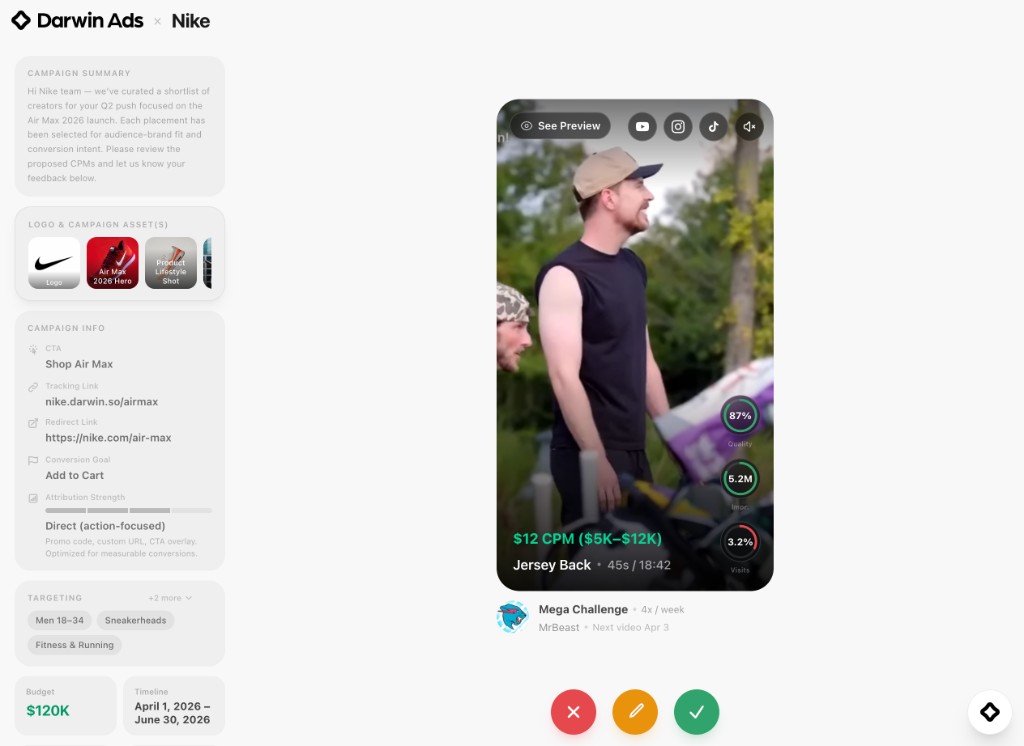
Darwin Ads approval interface — a portrait video card shows MrBeast's Mega Challenge with $12 CPM pricing, Jersey Back slot at 45s, See Preview button, platform icons for YouTube, Instagram, and TikTok, and three metric rings for Quality (87%), Impressions (5.2M), and Visit Rate (3.2%)
Each placement is a card with auto-playing video. The creator's real content — not a static thumbnail. At the bottom, you see the proposed CPM and budget range in green ($12 CPM, $5K–$12K), the slot name (Jersey Back), duration (45s), and where it sits in the video (18:42). Platform icons on the right — YouTube, Instagram, TikTok — link directly to the creator's profile on each. Below the card: creator avatar, series name (Mega Challenge), upload cadence (4x/week), and next projected video date.
The left sidebar holds the full campaign brief. Campaign summary, brand assets with labeled thumbnails, CTA (Shop Air Max), tracking link (nike.darwin.so/airmax), redirect link, conversion goal (Add to Cart), attribution strength, targeting segments (Men 18–34, Sneakerheads, Fitness & Running), total budget ($120K), flight dates, target impressions (2M+), and target visit rate (2.4%). Everything a media buyer needs is on screen — no separate brief document, no deck to cross-reference.
Counter on the Spot
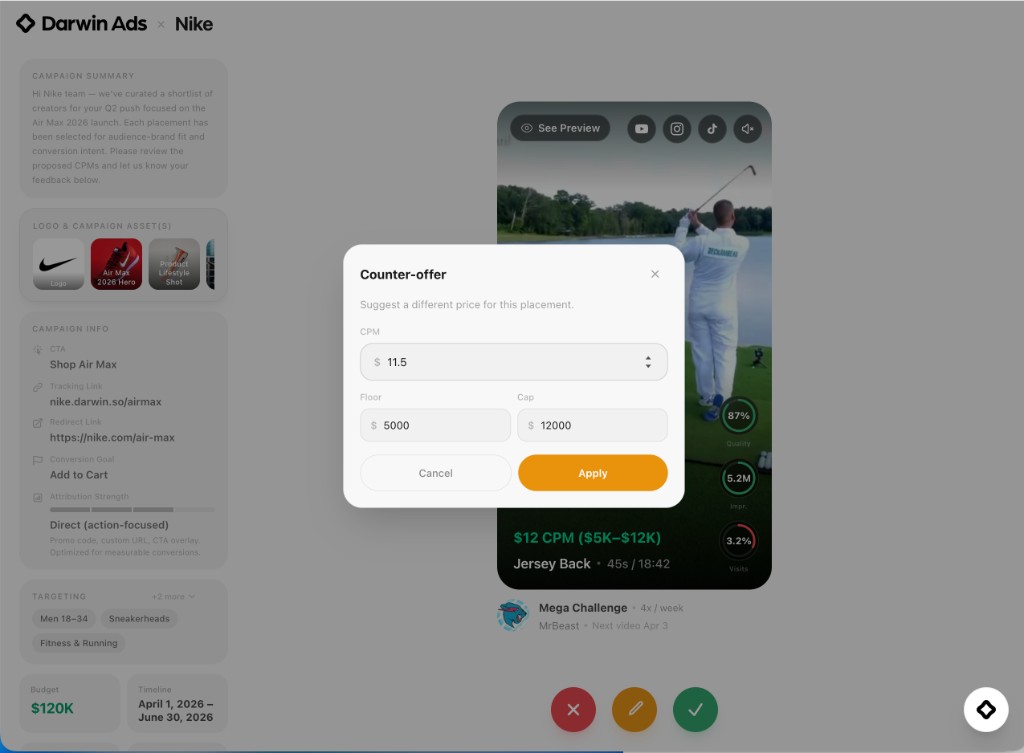
Counter-offer modal showing CPM input at $11.5, Floor at $5,000, and Cap at $12,000, with Cancel and Apply buttons
Three buttons sit at the bottom of every card. Green approves at the proposed price. Red rejects with a required reason. Amber opens the counter-offer — a focused modal where you adjust the CPM ($11.5), set a floor ($5,000), and set a cap ($12,000). Hit Apply and the card advances. The system records exactly what you changed versus the original proposal, so the other side sees a clean diff. No ambiguity about whether you accepted the price or restated it.
Counter-offers adapt to the pricing model. If a placement was proposed at a flat rate, you see one price field. If it was CPM-based with a range, you get all three inputs. Each decision triggers a quick animated overlay — green check or red X — confirming your choice before the next card slides in.
Measure Before You Commit
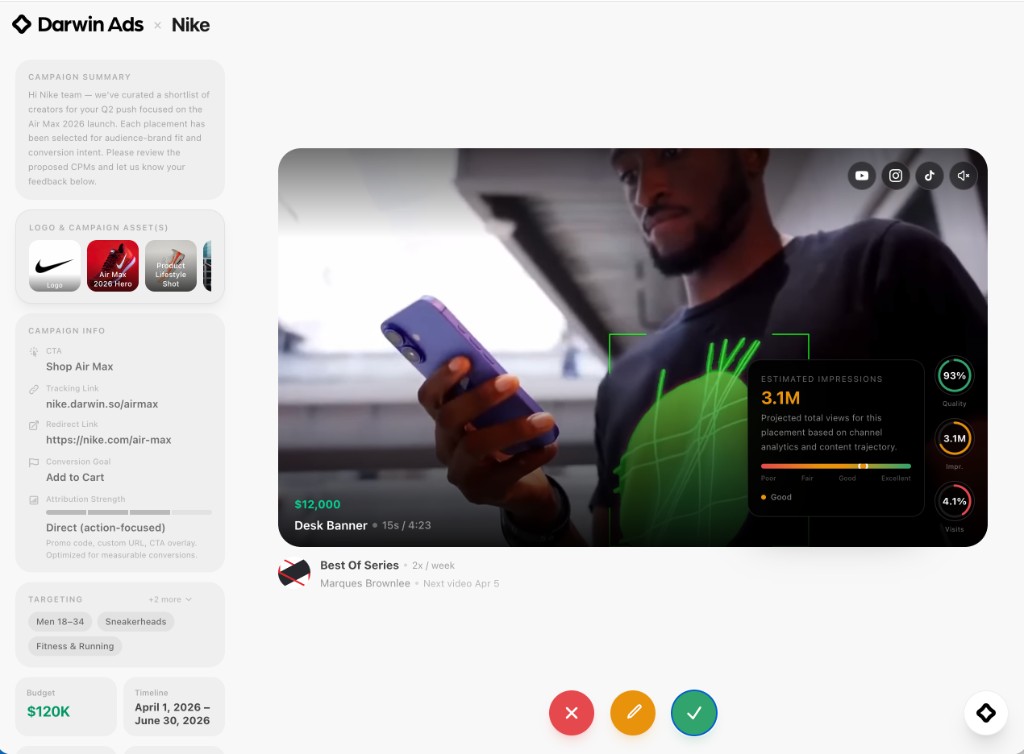
Landscape video card for MKBHD's Best Of Series showing $12,000 fixed price, Desk Banner slot, with an Estimated Impressions popover displaying 3.1M projected views rated Good, alongside metric rings for Quality (93%), Impressions (3.1M), and Visit Rate (4.1%)
Three performance rings sit alongside every card: Placement Quality, Estimated Impressions, and Estimated Visit Rate. Tap any ring and a popover breaks down the score — projected total views based on channel analytics, quality rating from Poor to Excellent, and a color-coded progress bar. The MKBHD placement above shows 3.1M estimated impressions at 93% quality and a 4.1% projected visit rate. These aren't vanity numbers — they're calculated from the creator's actual retention curves, audience demographics, and historical conversion data.
The "See Preview" button in the top-left crossfades to a composited image showing what the placement will look like in the creator's video — the brand asset rendered in context, at the right scale, with matched lighting. This is Atlas output, Darwin's adaptive generation engine. You're seeing the final product before committing a dollar. Both portrait (9:16) and landscape (16:9) formats are supported. The interface adapts — portrait cards show metric rings on the right edge, landscape cards show them bottom-right with larger labels.
Review and Submit
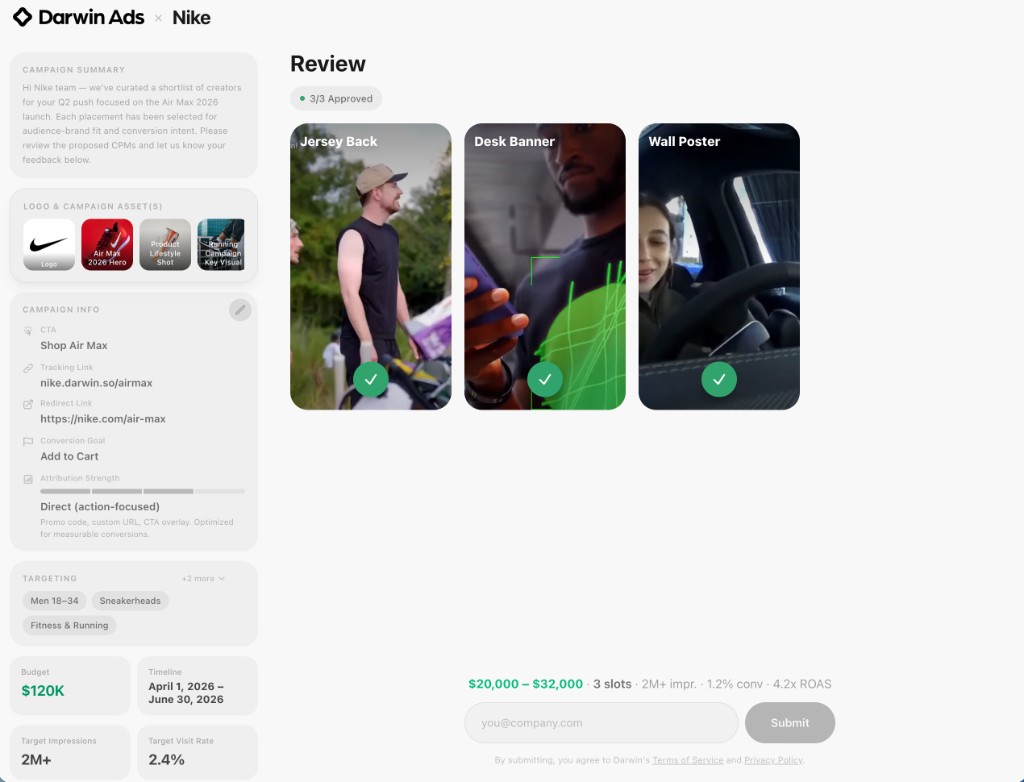
Summary page showing 3/3 Approved with a grid of three placement cards — Jersey Back, Desk Banner, and Wall Poster — each with green checkmark overlays, estimated spend of $20,000–$32,000 across 3 slots, 2M+ impressions, 1.2% conversion, 4.2x ROAS, and an email input with Submit button
After the last card, a summary page lays out every decision in a grid. Jersey Back, Desk Banner, Wall Poster — each thumbnail shows your call as a colored overlay. A count at the top reads 3/3 Approved (or whatever mix of approved, countered, and rejected you chose). Below the grid: estimated total spend ($20,000–$32,000), slot count, projected impressions (2M+), conversion rate (1.2%), and ROAS (4.2x). Tap any card to go back and change your mind. When it's right, enter your email and hit Submit.
What Happens After
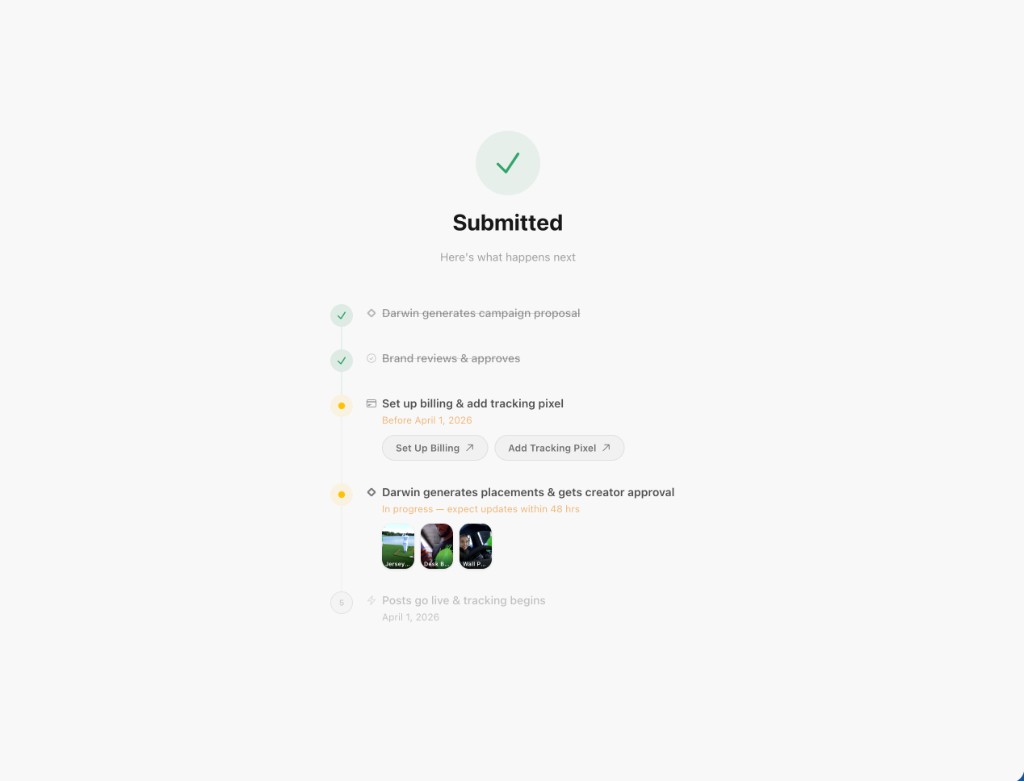
Submitted confirmation with a green checkmark, followed by a timeline: Darwin generates campaign proposal (done), Brand reviews & approves (done), Set up billing & add tracking pixel (action required with buttons), Darwin generates placements & gets creator approval (in progress with thumbnail previews), Posts go live & tracking begins (upcoming)
Submit and the page becomes a timeline. Each step is tracked: Darwin generates the campaign proposal (done), brand reviews and approves (done), billing and tracking pixel setup (action required — two buttons link directly to setup flows), Darwin generates placements and gets creator approval (in progress, with thumbnail previews of each slot), and finally posts go live and tracking begins. No separate status page, no check-in emails. The same link you used to approve is the same link you use to track what happens next.
The creator side mirrors this with its own timeline — slot matching, upload instructions, placement generation, scheduling, and payout tracking. Both sides see real status, not placeholder estimates.
The Creator Side
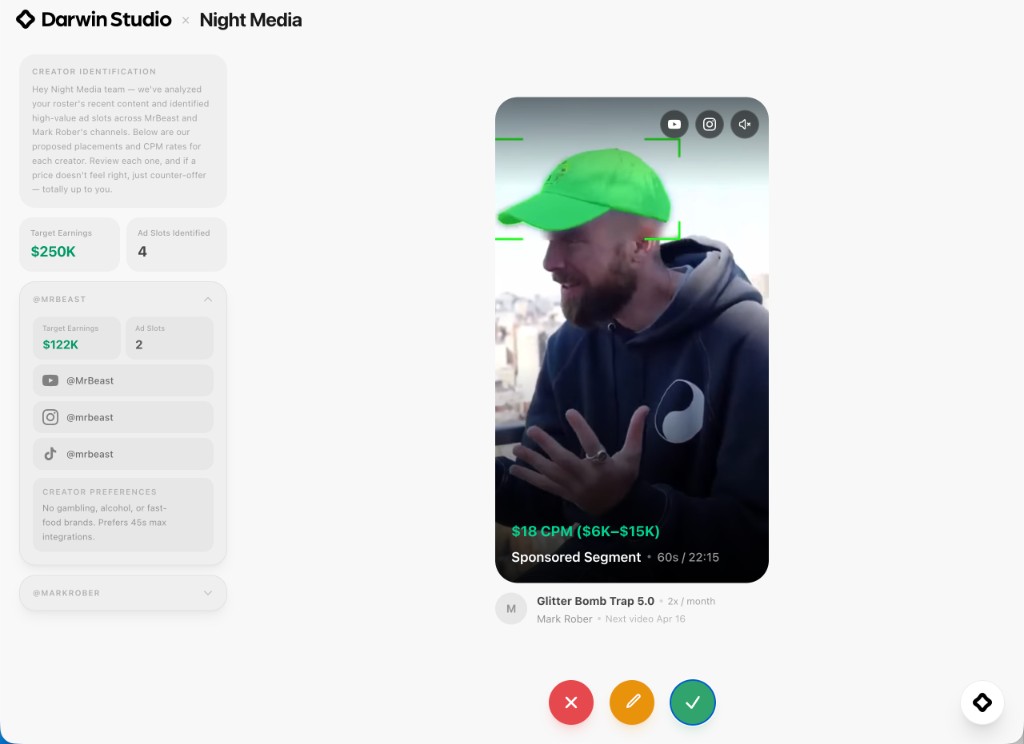
Darwin Studio approval for Night Media — Mark Rober's Glitter Bomb Trap 5.0 at $18 CPM ($6K–$15K), Sponsored Segment at 60s/22:15, with creator sidebar showing @MrBeast target earnings of $122K across 2 ad slots, YouTube/Instagram/TikTok handles, and creator preferences
Darwin Studio runs the same flow for creators and talent managers. Night Media opens a link, and instead of a campaign brief they see their own roster — @MrBeast with $122K target earnings across 2 ad slots, @MarkRober below. The sidebar breaks down each creator's handles across YouTube, Instagram, and TikTok, along with preferences (no gambling, alcohol, or fast-food brands; prefers 45s max integrations). The card shows Mark Rober's Glitter Bomb Trap 5.0 at $18 CPM with a $6K–$15K range, Sponsored Segment slot at 60s, 22:15 into the video.
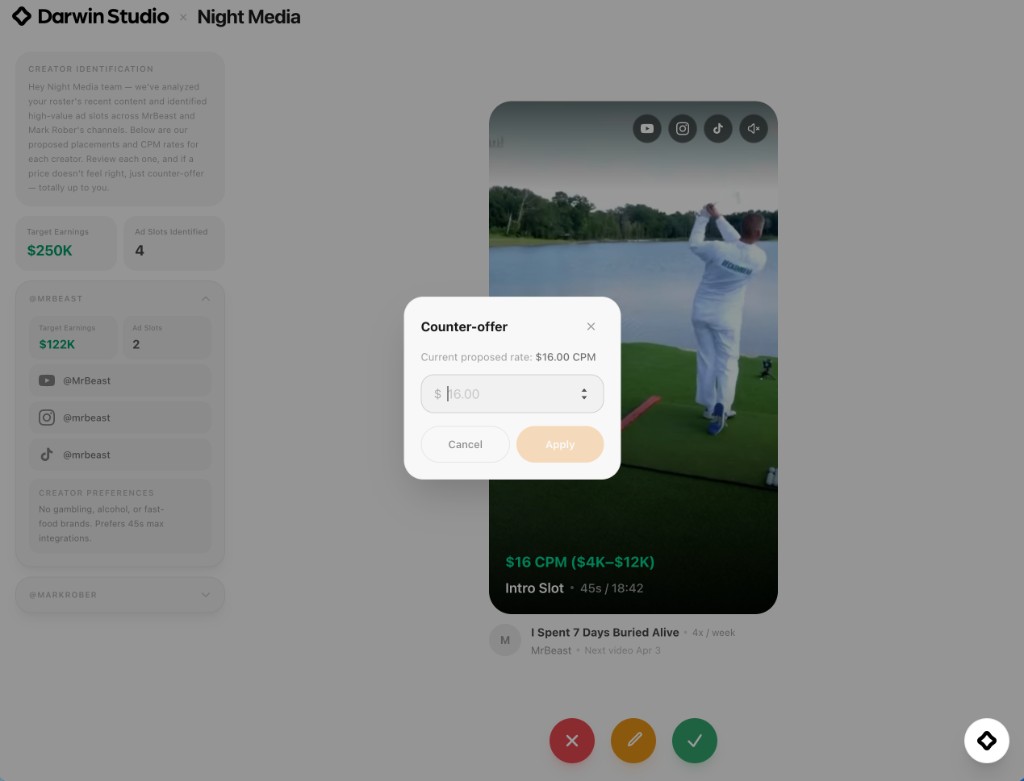
Studio counter-offer modal showing current proposed rate of $16.00 CPM with a single CPM input field, Cancel and Apply buttons
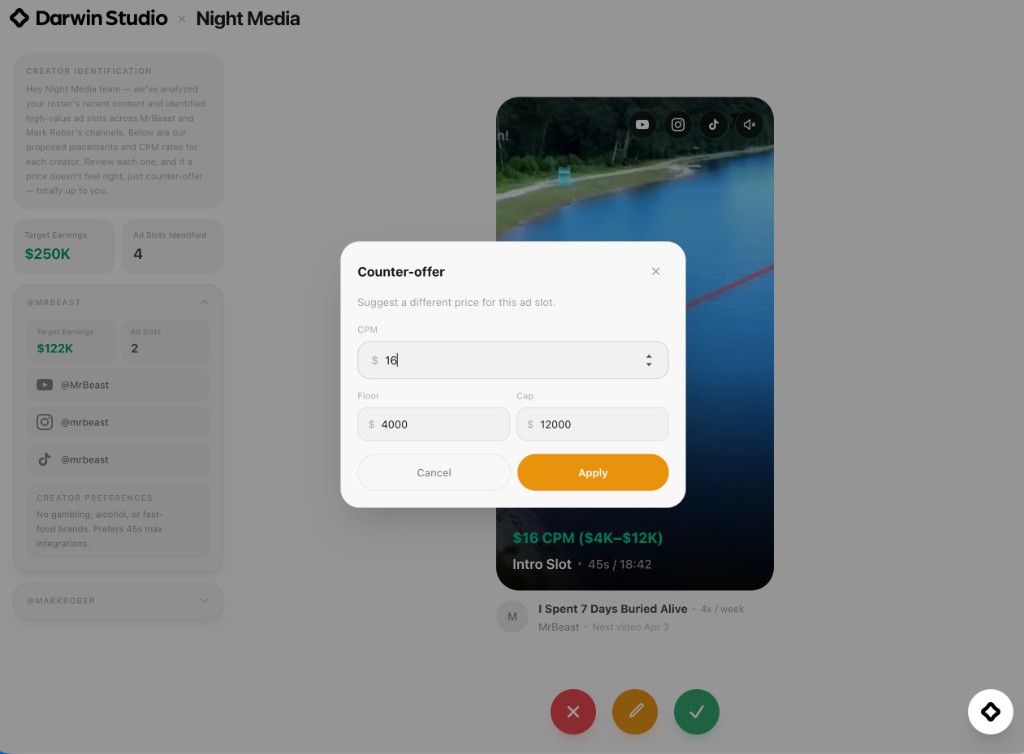
Studio counter-offer with CPM at $16, Floor at $4,000, and Cap at $12,000 for MrBeast's I Spent 7 Days Buried Alive, Intro Slot at $16 CPM ($4K–$12K)
Counter-offers on the creator side show the current proposed rate upfront — $16.00 CPM — so there's no guessing what you're working from. Adjust the CPM, or expand with floor and cap inputs if the slot has a range. The modal is simpler than the brand version because creators are negotiating one variable: their rate. Two taps — adjust, apply — and you're on to the next slot.
After the Creator Submits
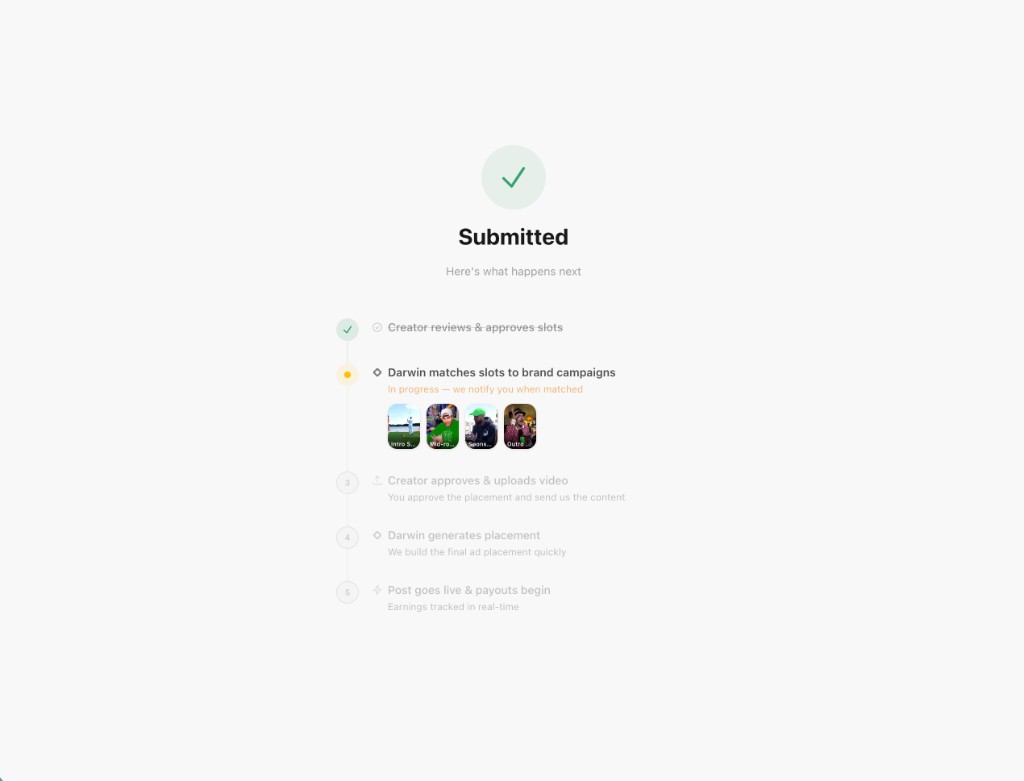
Studio submitted timeline — Creator reviews & approves slots (done), Darwin matches slots to brand campaigns (in progress with 4 slot thumbnails), Creator approves & uploads video, Darwin generates placement, Post goes live & payouts begin with real-time earnings tracking
The creator's post-submission timeline mirrors the brand side but tracks what matters to them. Creator reviews and approves slots (done). Darwin matches those slots to active brand campaigns (in progress — four slot thumbnails show what's being matched). Next: the creator approves the final placement and uploads their video. Darwin generates the composited ad. The post goes live and payouts begin — earnings tracked in real-time. Same link, same status, different perspective.
What's Next
1-Click Approval is the transaction layer. Everything else builds on top — real-time negotiation threads, multi-round approvals for recurring campaigns, automated re-proposals when a creator's schedule shifts mid-flight. The link is the foundation.
Open Darwin Ads to see it live. If you're a creator on Darwin Studio, your next ad slot review arrives as one of these links. We ship every two weeks.
Authors & Contributors
Sanjit Juneja, Founder & CEO
Soham Parekh, Member of Technical Staff
Jason Festa, Creative Director